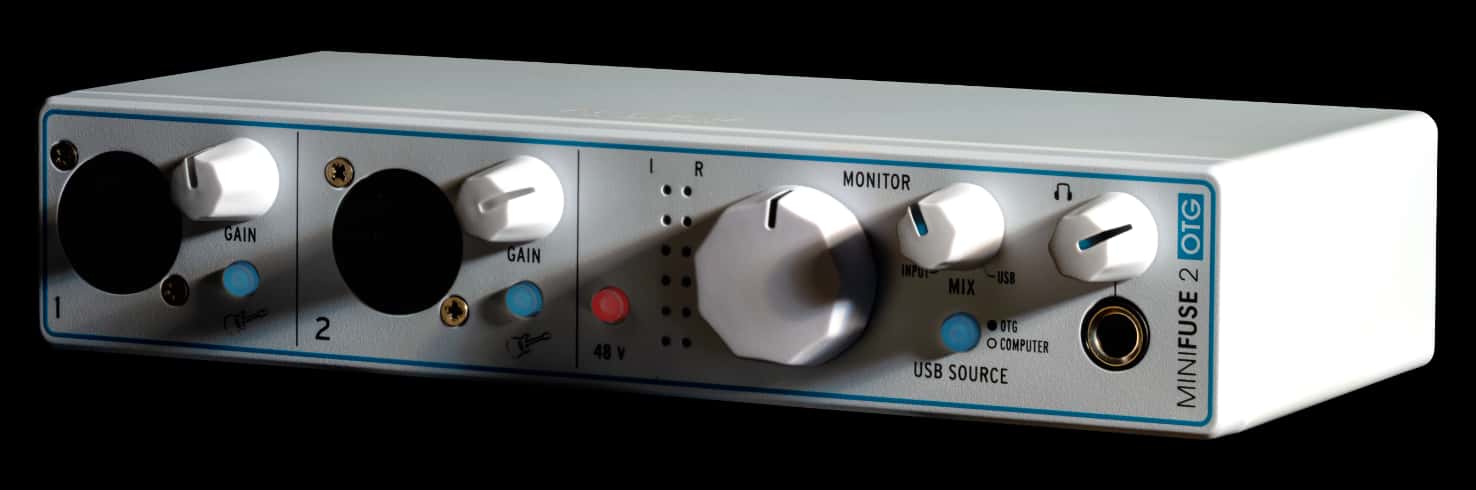
Arturia has introduced the MiniFuse 2 OTG , the latest in their line of audio interfaces.
They say that it’s designed for people who need to produce live audio content “on the go”, but are struggling to handle complex audio routing.
The USB-C interface can connect to your desktop or mobile devices, and features 2 combo Mic/Inst/Line XLR inputs and 2 1/4″ TRS balanced line outputs. In addition, it lets you stream from one USB-C device and record to the other.
Features:
- 500 vintage & modern keyboard presets with Analog Lab Intro
- Arturia FX Suite:
- Rev PLATE-140 reverb
- Pre 1973 vintage preamp
- Delay TAPE-201 echo
- Chorus JUN-6 analog chorus
- Tutorials – learn recording, streaming, and production basics with MiniFuse
- Exclusive content – tips, tricks, and advice from industry experts
- Dedicated online portal – access everything you need in one place
- Subscriptions – complimentary introductions to world-class audio & mixing services
- 2 x combo Mic/Inst/Line XLR inputs with 48V phantom power and instrument/line level switch
- 2 x 1/4 TRS balanced line outputs with dedicated monitor level control
- 1 x stereo headphone output with independent volume control
- Dual USB connectivity – connect computer + phone/tablet simultaneously (OTG & main USB)
- Direct Monitor & USB Source selector – blend between DAW, OTG, or both for flexible monitoring
- Loopback function – capture computer audio for streaming or recording
- Direct mono summing – set via MiniFuse Control Center
- 1 x USB2 type A hub (200mA max.) for MIDI controller or USB device
- Compatible with thunderbolt via 3rd party adapter
- Backlit gain knobs with real-time overload indication
- Bus-powered USB-C interface – class-compliant, compatible with PC, Mac, tablets & mobile devices
- *OTG-port is data-only and does not power or drain connected devices
Pricing and Availability:
The Arturia MiniFuse 2 OTG is available now for $219 USD.
The most interesting feature for us here at Synthopia -I recon – is not stated. I.e. round robin latency. This of course will also depend somewhat on your computer – but again… Most interfaces these days sound decent. Low latency however is what makes an audio interface usable or not when playing software instruments.
Round Trip Latency (RTL) -not round robin (the rotation of synth voices) is critical for real time monitoring of external input and outboard gear. It measures the time an analog signal takes to travel from input through the computer/DAW/interface and back to analog output.
Latencies below 10ms of true RTL are considered imperceptible and anything under 20ms is generally functional. Audio interface companies usually do not publish RTL numbers as it varies significantly with system configuration.
Thanks for the correction of terms. 🙂 English is not my first language. However – I think that when playing rythmic stuff you would need to be well under 7ms. I can feel 10ms quite easily. My current system has got a an RTL a little above 3ms, but of course – there are some plugins (only used for mixing) that will add quite a lot latency making playing uncomfortable.
I can understand the concern. I struggle to play fast keyboard when there’s a big latency. Current Macbook built-in audio is definitely too laggy.
If you want to get it right, there are charts online, I recommend to google audio interface latency chart. As UKifi says, it’s possible that below a certain point it doesn’t matter.
Any chart like this may show the difference in driver efficiency, but it will still be system dependent and likely won’t translate to your system.
As you said the numbers are usually so low that they don’t matter much for most applications.
You should not have noticeable latency on current Macs when playing virtual instruments with the built in audio unless you set your buffer size too high, use a DAW’s CPU protection feature or use a plugin with a large internal buffer. Even if that plugin is on another channel it can affect latency due to the DAW’s built-in delay compensation.
Thanks, about M1 Macbook Pro 16″, with the lowest buffer size in Logic it was still quite bad for me, and worse than the Intel ones used to be. It’s fine with an Audient or Focusrite audio interface though. This is with both VSL and Pianoteq and with headphones, played via midi coming from a digital piano. I haven’t actually measured anything though. Someone said maybe it’s because they do some processing to make the internal speakers sound really good (which they do).
Too laggy? I get a steady 0.6 ms roundtrip latency in Logic Pro with the built in audio on my Macbook Pro M4 Pro. 192 kHz at 32 samples buffer.
While perhaps not superpractical for everyday use, it sure does handle it.
Thanks for clearing up the terminology. 🙂 Personally I have trouble playing over 7ms. Especially rythmic stuff. Pads are of course more forgiving. Currently my system got a total somewhat above 3ms (depending on heavy “lookahead” plugins of course – but they are mostly using in mixing.
Sorry for the double post. My first one was awaiting moderation – but it took more than a day, so I assumed it was gone in the huge interweb wastebin..